
Charlie
Convenience beats privacy
At Bikkelhart almost everyone knew client data doesn't really belong in an AI tool.
Still, client names, interview transcripts and other traceable data regularly ended up in tools like ChatGPT.
Not because employees were intentionally taking risks. Usually they just needed to summarize, rewrite or look something up quickly.
I researched why knowing better isn't enough in the moment and built Charlie: a Chrome extension that helps employees be more mindful about generative AI while they work.
Everyone knew. It still happened.
The initial research results looked reassuring.
In the survey, 82.4% of employees said they didn't share client data with AI tools. On paper, things looked pretty good.
But on the floor, I saw a different story.
Names, transcripts and other traceable info were definitely being dropped into ChatGPT. Rarely with bad intentions, but in the moment, keeping the momentum going just felt more important than stopping to think it through.
Ethics didn't have a solid spot in the daily workflow either. When asked if they considered ethics while using AI, 61.8% gave a neutral answer.
That doesn't mean they didn't care about ethics. It just means it wasn't a structural part of how they worked.
A coworker summed up the tension perfectly:
The downside is that convenience always beats privacy.
That gap between what people value and what they actually do is called the privacy paradox. We want to handle data carefully, but in reality we often pick the route with the least time, effort and extra steps.
So the knowledge was there, but in the heat of the moment it's a losing battle.
The problem lived right before hitting send
It wasn't a lack of willingness from employees, they just lacked clear boundaries right when those boundaries mattered most.
What can you share? When is data still traceable? When do you need permission? How do you spot bias? And when should a client actually know AI was part of the process?
A manual can answer all those questions.
Just not when the prompt is already typed out and the cursor is hovering over send.
The most critical choice didn't happen during a training session or in an internal document, but in those few seconds between typing and sending.
So that's exactly where the solution needed to be.
Not another training or manual. But a quick intervention right inside the workflow that interrupts automatic behavior just long enough to make a conscious choice.
How do you create awareness at that exact moment without unnecessarily stalling the work?
A familiar dog with a new job
If the intervention had to happen right before hitting send, it also needed to feel intuitive and approachable right away.
The solution became Charlie, based on the dog of one of Bikkelhart's founders.
Charlie sometimes tagged along to the office and was already a familiar face to a lot of employees. That made him a way more logical starting point than some generic warning icon or yet another red shield with an exclamation mark.
That choice ties into the mere-exposure effect. We generally trust things we see more often, which quickly leads to a positive association.
An unknown ethical assistant starts from scratch.
Charlie already had a head start at Bikkelhart.
That's why he operates directly inside ChatGPT. As soon as he spots a potential risk, a quick notification pops up:
- 1
You write a prompt.
- 2
Charlie points out what he notices and why it matters.
- 3
You tweak the prompt or consciously proceed.
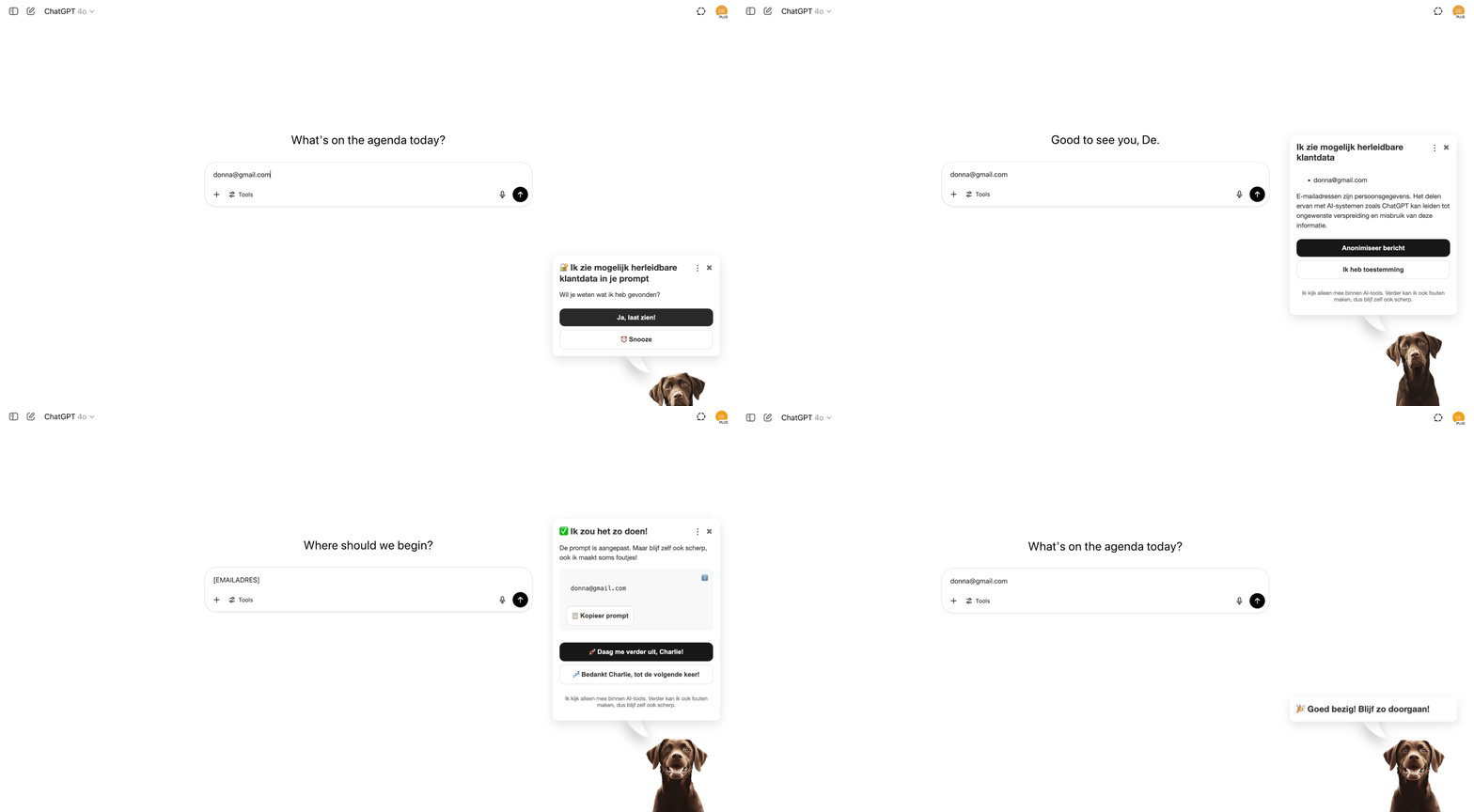
For example, he can anonymize personal data, make biased phrasing more neutral or help ask a client for permission.
A familiar dog, but with a new mission.
Charlie could warn, never decide
But a friendly dog in your browser doesn't automatically solve the ethical puzzle. On top of that, an ethical assistant can easily become an ethical issue itself.
When Charlie decides what's right or wrong, the responsibility shifts from the employee to the tool. That quickly leads to the mindset:
If this tool says it's fine, I say it's fine.
That defeats the whole purpose.
Charlie wasn't meant to be a moral referee, but a tool that helps employees look at their own choices more consciously. Plus, ethical choices depend on context. The exact same info can be harmless in one situation and highly sensitive in another. Charlie might misread that context or miss a risk entirely. AI isn't flawless.
That's why he never gives a final verdict.
He highlights a potential issue, explains why he's chiming in and offers help. Advice can be tweaked, ignored or dismissed. The final call always stays with the user.
That human control isn't just ethically important. It also dictates whether employees actually trust Charlie. Because recognizing him doesn't automatically mean trusting him.
But what does ethics actually mean in this context?
My research kept pointing back to four core principles as the bare minimum for ethical AI use:
Transparency
The user understands why Charlie shows up, what he flagged and what his limitations are.
Control
Advice can always be ignored or edited. You also need the option to temporarily pause Charlie.
Privacy
It needs to be clear where Charlie is active, what he can read and when data gets analyzed.
Accountability
The employee remains fully responsible for what gets shared. Even when Charlie stays quiet.
Ethical AI supports human decisions instead of replacing them. But that only works if the user understands what's happening and actually feels like they're in the driver's seat.
Don't just warn. Help.
If Charlie leaves the choice up to the user, he also needs to make that choice easier. A warning without a solution just adds a new problem to the pile.
A prompt saying 'This contains personal data' tells you something needs to happen. But the user still has to figure out which parts are sensitive, how to anonymize them and if the prompt even still makes sense afterwards.
In a busy moment, hitting the close button remains the easiest and most appealing option.
That's why Charlie links a warning to a concrete next step wherever possible.
This is a form of nudging. The user isn't forced into anything, but the conscious choice becomes way easier to execute.
The interface had to actually support that freedom of choice.
In an early build, a generated consent message dropped directly into the ChatGPT input field. It saved a click, but it also implied Charlie had already made the decision for you.
So the message moved back to the pop-up. The user sees the suggestion first, checks the content and then decides whether to use it.
A little more friction before the decision.
A lot less friction when actually solving the problem.
The first version helped. And sometimes it just got in the way.
For the first round of testing I purposely didn't explain Charlie at all.
Six employees from different departments clicked through the prototype on their own screens. They got zero introduction and had to use the onboarding to figure out who Charlie was, when he'd pop up and what he wanted from them.
If the concept only made sense with me narrating next to it, the onboarding simply wasn't clear enough.
The friendly tone worked. Charlie felt more approachable than a formal warning and actually got users thinking.
A copywriter captured the effect perfectly:
I always just winged it, but now I actually pause and think.
But not everyone needed the same level of support.
A visual designer who was already strictly anonymizing data didn't see much personal value at first. But during the test he realized her coworkers didn't always handle things the exact same way.
I assumed everyone already did this. That surprises me.
So one person needed an active safety net. Another just needed reassurance in moments of doubt.
At the same time the weak spots surfaced quickly. The onboarding was too text-heavy, still too vague and it didn't immediately pinpoint the actual problem.
But the biggest risk was frequency.
When Charlie pops up constantly, a helpful assistant turns into the new Clippy real fast.
Less barking. Better timing.
The testers couldn't quite agree on how many notifications were acceptable.
One participant felt Charlie should happily repeat a warning a hundred times if the behavior stayed risky a hundred times.
Another pictured writing five prompts in fifteen minutes and basically thought: "okay, I get it now".
That contradiction wasn't a useless test result. It was exactly the core design challenge.
A notification needs to be visible enough to interrupt automatic behavior, but shouldn't show up so often that dismissing it becomes the new automatic behavior.
When warnings repeat too often, habituation kicks in. The message is still on the screen, but it gets less and less conscious attention. More warnings end up leading to less awareness.
So the next iteration got smaller, quieter and more selective. Charlie only shows up when there's a valid reason to break someone's focus, instantly providing enough context to justify the interruption.
Users also wanted to see exactly what he does and doesn't read, the ability to pause him temporarily and the option to summon him manually when in doubt. Plus, advice needed to align better with the context of a project.
Not every feature request made it into the proof of concept. But together they all pointed in the exact same direction.
Charlie needed to be a safety net, not a police dog.
Explain now. Dive deep later.
The Chrome extension has one main job: helping with the exact prompt being written right then and there.
When someone's in the zone, it's rarely the right time for a deep dive into AI ethics.
That's why Charlie got two layers of information.
The extension only shows what's strictly necessary to understand the current risk and potentially fix it. The dashboard provides the space to look back and learn more later.
That's where employees can find past warnings, check their progress and spot patterns. Forgetting to anonymize once happens. The tenth time, it might be time to rethink things.
It also acts as a fallback. If you accidentally dismiss a warning, you don't lose the notification. A potential risk doesn't just magically disappear along with the pop-up.
The knowledge base then offers a deeper dive into privacy, bias, transparency and compliance. Charlie can even suggest relevant articles based on your previous warnings. So not everyone has to sit through the exact same comprehensive AI course before things get useful.
On top of that, there's a daily ethical dilemma. Ethics rarely has one undisputed answer. By responding yourself first and then checking out arguments from coworkers, you start seeing where values and perspectives clash. And simply thinking about these topics helps with awareness as well.
Seperating the two follows the principle of progressive disclosure. All the information stays available, but it doesn't just get dumped right in the middle of your workflow.
The extension helps in the moment.
The dashboard helps you dig deeper and reflect.
From sketch to working extension
After the initial tests it was clear what Charlie had to do better. He needed to be smaller, clearer and way more selective.
Iterations
But you just can't accurately judge timing, frequency and interruptions in a static design.
A pop-up might look calm and helpful in Figma. Inside a real workflow, that exact same pop-up can suddenly feel annoyingly large, awkwardly placed or simply on screen way too often.
That's why I actually built Charlie as a working Chrome extension inside ChatGPT.
The first technical build had one simple job: spot a specific word in a prompt and trigger a pop-up. Once that foundation worked, I expanded the system with context analysis through an API.
Depending on the input, Charlie triggers different flows:
Privacy
Spotting potentially sensitive data and suggesting an anonymized version.
Bias
Flagging biased phrasing and offering a more neutral alternative.
Consent
Helping draft a message to ask a client for permission.
Reflection
Offering an optional, quick reflection question after a relevant moment.
Tech Stack
Chrome Extension · JavaScript · OpenAI API · HTML · CSS
The extension worked. Now to see if it actually helped.
Armed with the working version, I tested again with employees from various disciplines.
This time the scenarios happened straight in ChatGPT. Testers typed in prompts containing personal data, potential bias and information that might require consent. Charlie reacted right then and there with a warning and a potential next step.
That didn't just prove whether the extension worked technically, but also exposed what the intervention actually did to the user's behavior.
A marketing automation specialist considered himself pretty aware beforehand. During the test, bias turned out to be a topic he just hadn't really thought about yet. The idea that a client name combined with other context could be sensitive also made him look at his own prompts differently.
A content specialist started from a totally different angle. She admitted she previously dropped a lot of info into ChatGPT without a second thought. After the test, she basically spelled out Charlie's exact goal:
I definitely started thinking like okay, you can't just throw everything straight into ChatGPT.
That contrast was huge. Charlie didn't just work for employees who didn't know much about AI ethics yet. People who already thought of themselves as hyper-aware discovered smaller blind spots that previously stayed off their radar.
The concrete next steps were received really well. Auto-anonymizing saved time, and a neutral alternative made the warning instantly actionable.
One tester clearly summed up exactly what Charlie's role should be:
As long as you don't start banning things. Giving suggestions to be smarter and better, that would be awesome.
That was exactly the sweet spot. Charlie needed to step in just enough to interrupt autopilot mode, but never so much that the employee lost control.
Built for Bikkelhart
Charlie was built specifically for the culture and workflow at Bikkelhart.
The dog, the tone, the examples and the guidelines align perfectly with the agency. That made the assistant highly recognizable and accessible, but it also means the concept can't just be copy-pasted to any other organization without tweaks.
For wider adoption, agencies need the freedom to set up their own guidelines, terminology, tone of voice and tech integrations. The character itself has to remain optional too.
Because frankly, not every agency is waiting around for a dog handing out AI advice.
The four underlying principles hold up though: transparency, control, privacy and accountability.
The wrapper changes per organization.
The responsibility doesn't.
From 'I know' to 'hang on a second'
The final result is a working Chrome extension, onboarding and a personal dashboard concept.
Charlie spots potential risks around privacy, bias and consent, explains why they matter and immediately offers an actionable next step. The choice always stays with the user.
The tests prove that this kind of intervention can genuinely boost awareness and reflection in the short term.
They don't prove lasting behavioral change just yet.
For that, Charlie needs to run in real-world projects for a longer period. Only then can we see which warnings employees actually follow up on, when habituation kicks in and if behavior ultimately changes even when Charlie stays quiet.
A successful user test shows that someone stops to think once.
Not that they'll automatically do the exact same thing a year from now.
But what did change during those tests, was the exact moment itself.
I know perfectly well I have to pay attention.
Hang on a second. Can I actually share this?
And Charlie lives right in between those two thoughts.