
BikkelBatch
From one color to a complete palette
A visual designer at Bikkelhart ran into a simple problem.
When you have one color, you want to quickly create a solid color scale. Not manually make ten boxes lighter and darker, not keep copying hex codes and not hope Figma AI turns it into something useful.
Because that last option went about how you would expect.
The colors mostly just got darker.
Technically a color scale. Visually: meh.
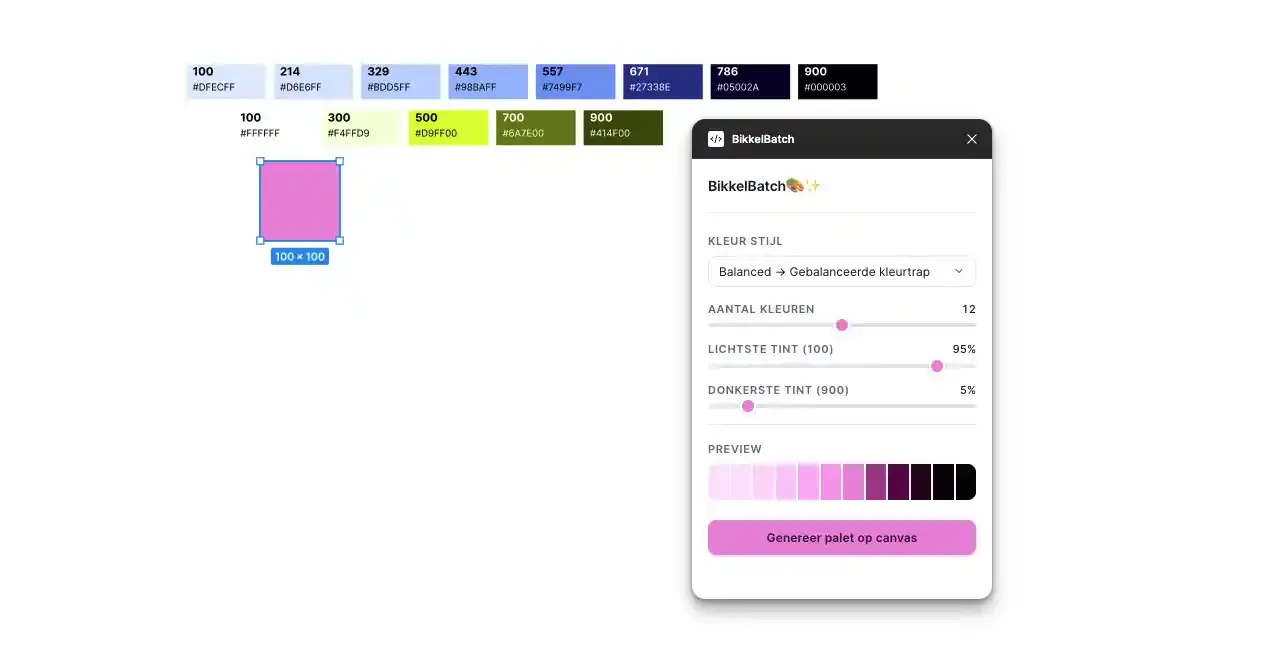
So I built BikkelBatch, a Figma plugin that turns one selected color into a complete color scale.
One color is rarely enough
In a design file, you rarely need only the base color.
You need lighter tints for backgrounds, darker tints for text, variations for hover states, borders and accents. Sometimes you also just need that one in-between color that is not in your styles, but happens to be exactly right in that moment.
Creating that manually takes time. Especially because a good color scale is not just a color made a little lighter or darker each time.
Sometimes the saturation needs to change too. Sometimes a tint can become slightly warmer or cooler. And sometimes you mainly want to avoid the light colors looking washed out and the dark colors turning into mud right away.
A color scale is not just a row from light to dark.
It is a small design decision.
Not every color scale should behave the same
The plugin starts with a selected object that has a color.
Then you choose what style the scale should have. Balanced creates an even color scale. Classic stays closer to standard light and dark variations. Vibrant increases the saturation. Muted makes the scale feel calmer.
There are also styles for warmer, cooler, softer, neon-like and vintage color scales.
The same base color does not work the same way in every context. For one interface, you might want a calm palette. For another, it can be warmer, brighter, softer or more muted.
That is why you can also decide how many steps the color scale should have and how light or dark the outer colors are allowed to become. At the bottom, you immediately see a preview, so you do not only find out after generating that it looks terrible.
The color had to behave normally
For the color calculations, I used OKLCH.
That sounds technical, but the problem is actually simple: colors do not always behave logically when you only adjust them in RGB or hex.
A color can suddenly become washed out, too intense or visually uneven between steps. The math may be correct, but the scale still does not feel right.
OKLCH is closer to how people perceive color differences. That makes it possible to work with lightness, chroma and hue in a way that stays more visually predictable.
The base color always stays in its exact position within the scale. All other steps are calculated around it.
Then the plugin adjusts the lightness, chroma and hue for each step. clampChroma keeps the chroma within the OKLCH range. After that, the RGB values are clamped again to what a screen can actually display.
- Read the selected Figma color
- Convert the color to OKLCH
- Calculate lightness, chroma and hue for each step
- Clamp the values and convert them back to RGB
A small tool for a repeated task
BikkelBatch started with one question: can this be faster?
The answer is yes.
A recurring task becomes faster, more consistent and less manual. Not a huge plugin with a hundred features, but exactly enough to solve the problem where it happens.
Right inside Figma.
That also fits the way I like to work. When a workflow keeps rubbing in the same place, the solution does not always have to be big. Sometimes a small tool is enough to make the work just a little smarter.
In this case: select one color, choose a style and get a usable color scale back.
It did not need to become much more complicated than that.
Technology
Figma Plugin API · TypeScript · JavaScript · Culori · OKLCH · esbuild